
Today DICE did an update to Battlefield 4 that includes AMD Mantle that has been picking up steam as to if it really will made a huge difference using the AMD GCN GPUs and the Mantle API. If you are unsure of what AMD Mantle is you can read my article here about what it is and how it will affect you. With the update DICE also has released their results with using AMD Mantle over DirectX 11 for Battlefield 4. AMD Mantle will be released shortly with the Catalyst Control 14.1 beta driver and you will be able to take advantage of the API.
DirectX 11 vs. AMD Mantle using Battlefield 4
Below are the screen caps that DICE released showing the differences that AMD Mantle can make using an AMD GCN GPU and the AMD Catalyst Control 14.1 beta drivers. To put Battlefield 4 thought its paces, using both DirectX 11 and AMD Mantle, DICE did three test which consisted of entry level, mainstream, and enthusiast level gaming machine. The entry level machine used the AMD A10-7850K APU which has an integrated R7 200 series GPU. Test at 1280 x 720 resolution, DICE reported a 14% higher frame rate using AMD Mantle over DirectX 11.
Entry Level Gaming Machine
Test case 1: Low-end single-player
CPU/GPU: AMD A10-7850K (‘Kaveri’ APU), 4 cores @ 3.7 GHz
Settings: 720p MEDIUM settings.
OS: Windows 7 64-bit
Level: Singapore “Beach”
This area is heavy on the CPU as it is quite a lot of action going on, but the game is primarily GPU-bound both on DX and with Mantle but thanks to GPU optimizations with Mantle we get a good performance improvement.
Result: 26.6 ms/f -> 23.3 ms/f = 14% faster
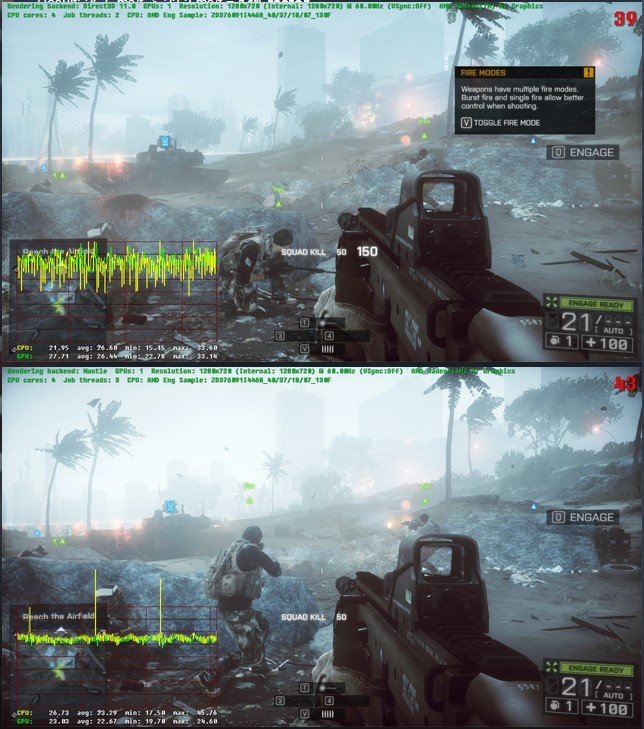
DICE Battlefield 4 Test Results – AMD Mantle vs DirectX 11 – Entry
Mainstream Gaming Machine
With the mainstream gaming machine DICE used an AMD FX-8350 and a AMD Radeon HD 7970 @ 1920 x 1080 resolution and ultra preset. The results were that the AMD Mantle gave up to 26% frame rate improvement over DirectX 11.
Test case 2: Standard 64-player multiplayer
CPU: AMD FX-8350, 8 cores @ 4 GHz
GPU: AMD Radeon 7970 3 GB
Settings: 1080p ULTRA 1x MSAA
OS: Windows 8 64-bit
Level: Siege of Shanghai
Level was tested with 64 “pseudo players” that we have for our own internal testing that simulates heavy game workload that we have in multiplayer in order to get more deterministic results compared to full real multiplayer. 64 players on the large Battlefield levels is really demanding of the CPU so this test case is primarily CPU-bound.
Result: 18.87 ms/f -> 15.08 ms/f = 25.1% faster
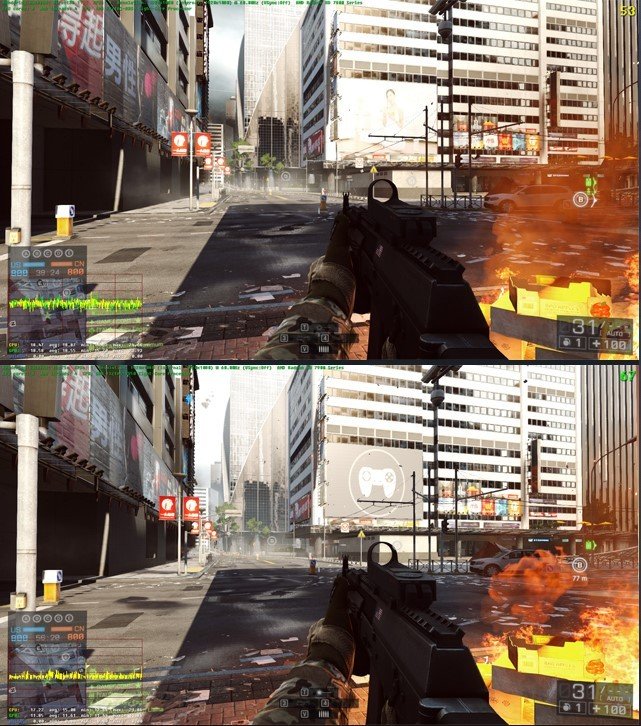
DICE Battlefield 4 Test Results – AMD Mantle vs DirectX 11 – Mainstream
Enthusiast Gaming Machine
Ok so the last and the one that we really care about is the best machine DICE used to test AMD Mantle. The enthistiast machine used an Intel i7-3960X and dual AMD Radeon R9 290X GPUs. DICE’s results were about 58% faster.
Test case 3: High-end single-player with multiple GPUs
CPU: Intel Core i7-3970x Extreme, 12 logical cores @ 3.5 GHz
GPU: 2x AMD Radeon R9 290x 4 GB
Settings: 1080p ULTRA 4x MSAA
OS: Windows 8 64-bit
Level: South China Sea “Broken Flight Deck”
This single-player scene is heavy on both the CPU and GPU with lots of action going on. Test was done on the highest end Intel CPU on Windows 8, which is the fastest option before Mantle thanks to DirectX 11.1. Still this CPU is not fast enough to keep the 2 290x GPUs fed at 1080p on Ultra settings so we get a significant CPU performance bottleneck which results in major performance improvement when enabling Mantle.
Result: 13.24 ms/f -> = 8.38 ms/f = 58% faster
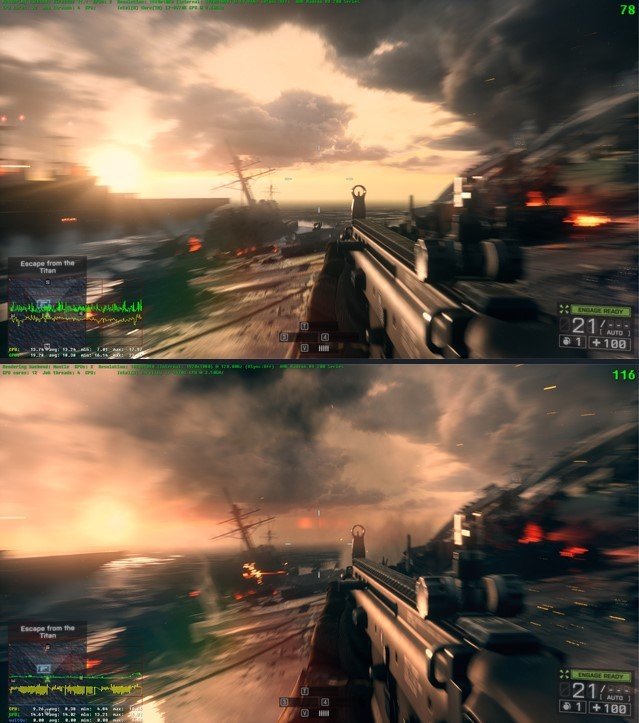
DICE Battlefield 4 Test Results – AMD Mantle vs DirectX 11 – Enthusiast
How to enable AMD Mantle in Battlefield 4
In order to use Mantle you will need the following:
- AMD Catalyst 14.1 Beta drivers. AMD will post them here.
- AMD Radeon GPU with Graphics Core Next
- 64-bit Windows (7, 8 or 8.1)
If you have the above you will see a new “Graphics API” option in the in-game Graphics Options settings after starting the game, here you can switch between using DirectX 11 and Mantle (remember to restart the game after changing).