
Having issues with 320.18? Well the Geforce 320.49 Beta Drivers are here!
Nvidia announced today that they released the Geforce 320.49 beta drivers to increase performance and fix issues with previous versions of the their drivers, which would specifically be the Geforce 320.18 drivers potentially causing damage to people’s graphics cards and giving them horrible artifacts and other display issues.
You can read the release notes here for the Geforce 320.49 beta drivers but here is a list of supposedly fixed issues with the Geforce 320.49 beta drivers over the Geforce 320.18 WHQL Drivers as well as the open issues that Nvidia has already identified with with the Geforce 320.49 beta drivers.
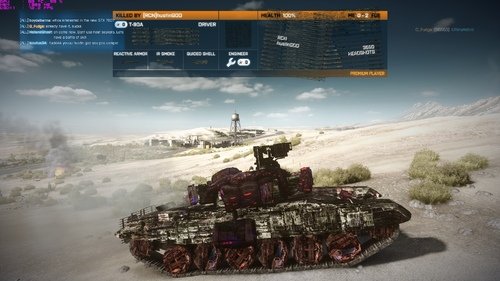
Image shows issues with 320.18
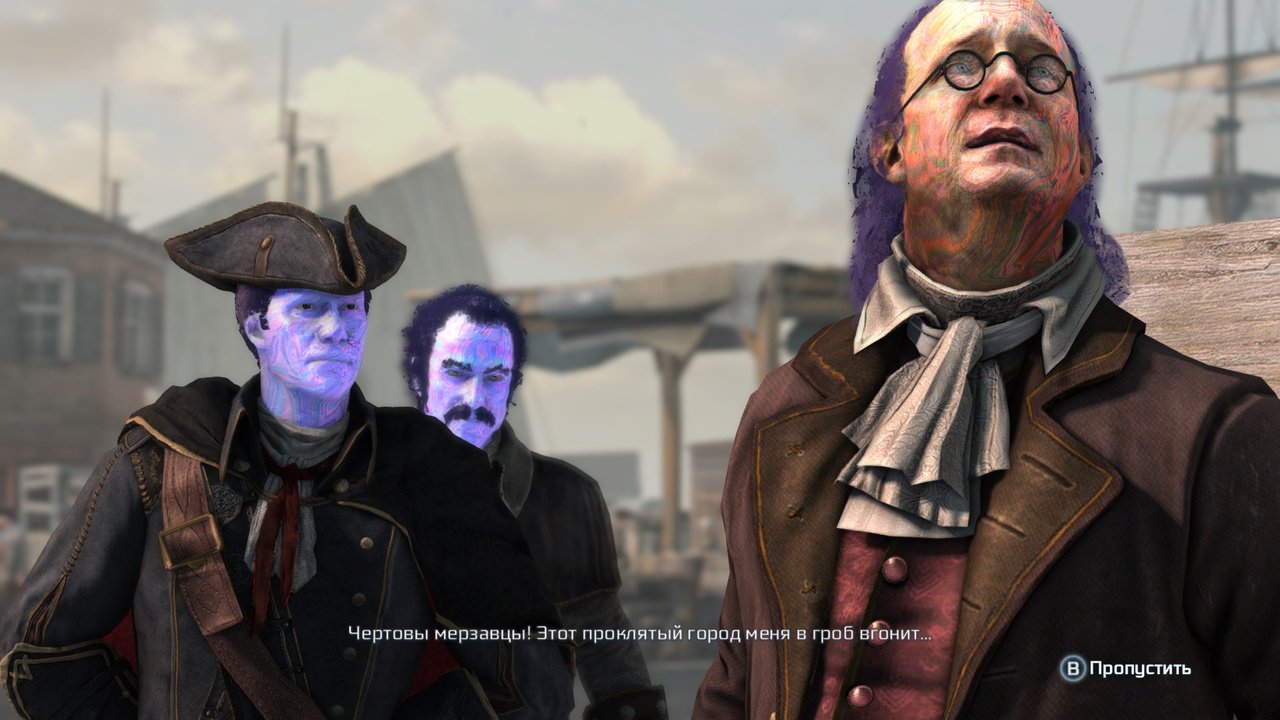
Image shows issues with 320.18
Changes and Fixed Issues in Version 320.49 Beta
The following sections list the important changes and the most common issues resolved
since version 320.18. This list is only a subset of the total number of changes made in this
driver version. The NVIDIA bug number is provided for reference.
Windows Vista/Windows 7 Fixed Issues with Geforce 320.49 Beta Drivers
- Battlefield 3: Blue rectangles appear when exploding a car within the game.
- [1282583]
- Eve Retribution: There is image corruption in the game. [1282302]
- Call of Duty: Black Ops 2: There are artifacts and graphics corruption in the game.
- [1277657]
- GeForce GTX 670: The GPU runs at a higher performance level more frequently with
- dual monitors enabled. [1279437]
- GeForce GTX 670 – Battlefield 3: The graphics in the game are corrupted. [1281730]
- GeForce GTX 680 – Assassin’s Creed 3: There is purple corruption during gameplay.
- [1290918]
- SLI – 3D Vision – GeForce GTX 680M – Notebook: The internal display goes blank after
- installing the driver and enabling SLI or stereoscopic 3D. [1297104]
- SLI – Surround – GeForce GTX 670: 2D Surround cannot be enabled when SLI is
- enabled. [1303522]
- SLI – Tom Clancy`s Ghost Recon Future Soldier: SLI profile needs to be updated.
- [1292762]
Windows 8 Fixed Issues with Geforce 320.49 Beta Drivers
- GeForce GTX 680 – Stereoscopic 3D: The NVIDIA Control Panel->Set up stereoscopic
- 3D->Stereoscopic 3D display type setting reverts from HDMI Checkerboard to 3DTV
- Play after rebooting the system. [1294390]
- SLI – 3D Vision – GeForce GTX 680M – Notebook: The internal display goes blank after
- installing the driver and enabling SLI or stereoscopic 3D. [1297104]
- SLI – Surround – GeForce GTX 670: 2D Surround cannot be enabled when SLI is
- enabled. [1303522]
- SLI – Tom Clancy`s Ghost Recon Future Soldier: SLI profile needs to be updated.
- [1292762]
- Release 319 Graphics Drivers for Windows – Version 320.49 RN-W32049-01v01
Open issues with the Geforce 320.49 Beta Drivers
As with every released driver, version 320.49 of the Release 319 driver has open issues
and enhancement requests associated with it. This section includes lists of issues that are
either not fixed or not implemented in this version. Some problems listed may not have
been thoroughly investigated and, in fact, may not be NVIDIA issues. Others may have
workaround solutions.
Windows Vista/Windows 7 32-bit Issues with Geforce 320.49 Beta Driver
Single GPU Issues with Geforce 320.49 Beta Driver
- PhysX: After installing the driver, occasionally the PhysX processor selection in the
- NVIDIA Control Panel is set to CPU instead of AutoSelect (Recommended), resulting
- in PhysX games running slowly. [1049752]
- To correct this, set the PhysX processor to Auto Select (Recommended).
- Video – Notebook – Internet Explorer – Stage Video: Stage Video picture-in-picture
- content cannot be played within Internet Explorer. [999929]
GeForce 500 Series open issues with Geforce 320.49 Beta Driver
- GeForce 500 series – Need for Speed: The Run: During the race the sun flickers and
- there are bright blips and black patches. [909577]
- GeForce 500 Series: Metro 2033–light bloom increases and decreases throughout the
- game at light sources such as bulbs, lanterns, or fire. [846214]
Multi-GPU Issues with Geforce 320.49 Beta Driver
- Quad SLI – GeForce GTX 295: “SLI connector is missing” balloon pops up even if the
- SLI bridge connector is attached.[919269]
Windows Vista/Windows 7 64-bit Issues with Geforce 320.49 Beta Driver
- Single GPU Issues
- Guild Wars 2: Ambient Occlusion effect disappears at different camera angles and
- when using supersampling. [1023202]
- PhysX: After installing the driver, occasionally the PhysX processor selection in the
- NVIDIA Control Panel is set to CPU instead of AutoSelect (Recommended), resulting
- in PhysX games running slowly. [1049752]
- To correct this, set the PhysX processor to Auto Select (Recommended).
GeForce 500 Serieswith Geforce 320.49 Beta Driver
- GeForce 500 series – Need for Speed: The Run: During the race the sun flickers and
- there are bright blips and black patches. [909577]
- GeForce 500 series: Deus Ex–there is corruption on the ground in later levels of the
- game. [871486]
- GeForce 500 Series: Metro 2033–light bloom increases and decreases throughout the
- game at light sources such as bulbs, lanterns, or fire. [846214]
- GeForce GTX 580: HAWX–during the game, an outline of an air plane appears in the
- upper left corner of the screen after pressing Alt+Tab. [746186]
- GeForce 400 series: Total War: Shogun 2 –the sun and surrounding area within the
- game flickers. [807036]
Multi-GPU Issues with Geforce 320.49 Beta Driver
- SLI, Company of Heroes: Tales of Valor: With SLI enabled, there is heavy flickering
- in the game after switching from windowed mode to full-screen mode. [892264]
- 3D Surround, SLI – Far Cry 2 DirectX 10: The ambient occlusion effect is misplaced in
- the game when in-game antialiasing is set to 4x or higher and ambient occlusion,
- stereoscopic 3D and Surround are enabled from the NVIDIA Control Panel. [986112]
GeForce 500 Series issues with with Geforce 320.49 Beta Driver
- SLI – GeForce 500 series: With SLI enabled, the secondary Dualview display may go
- blank after hot-plugging the DisplayPort monitor and then rebooting the system. [906810]
- 3D Surround, 3xGeForce 500/400 Series: When sending output to a fourth display
- outside of the GPU Surround group, the Surround resolution (3-wide) switches to a
- non-Surround resolution (single display). [736859]
- SLI, GeForce 500 Series: Dragon Age II (DirectX 11)–shadows flicker in the cutscene
- when SLI is enabled. [849235]
Windows 8 32-bit Single GPU Issues with Geforce 320.49 Beta Driver
- PhysX: After installing the driver, occasionally the PhysX processor selection in the
- NVIDIA Control Panel is set to CPU instead of AutoSelect (Recommended), resulting
- in PhysX games running slowly. [1049752]
- To correct this, set the PhysX processor to Auto Select (Recommended).
- Video – Notebook – Internet Explorer
- YouTube: The NVIDIA Control Panel video color settings have no effect on
- YouTube flash video playback within Internet Explorer 10. [999485]
- Stage Video: Stage Video picture-in-picture content cannot be played within
- Internet Explorer. [999929]
- Video – Notebook – Hulu Desktop: When attempting to play videos using Hulu
- Desktop, there is audio but no video. [1000017]
Windows 8 64-bit Single GPU Issues with Geforce 320.49 Beta Driver
- Guild Wars 2: Ambient Occlusion effect disappears at different camera angles and
- when using supersampling. [1023202]
- PhysX: After installing the driver, occasionally the PhysX processor selection in the
- NVIDIA Control Panel is set to CPU instead of AutoSelect (Recommended), resulting
- in PhysX games running slowly. [1049752]
- To correct this, set the PhysX processor to Auto Select (Recommended).
Multi-GPU Issues with Geforce 320.49 Beta Driver
- Surround – Far Cry 3: With 3D Surround enabled, the system hangs when changing
- the in-game Surround resolution. [1256120]
- To workaround, either turn of stereoscopic 3D (toggle using Ctrl+T) or switch the game to
- windowed mode before changing the resolution, then turn stereoscopic 3D back on (or switch
- back to full-screen mode if applicable) after changing the resolution
Join the Forum discussion on this post
Glad to hear they may have fixed it. I personally had no problems with 320.18. Maybe I was just lucky or maybe it was because I still use the older GTX 570 board? But have at least two friends that had horrible problems ranging from performance screw-ups to full blown, nasty artifact crashes.
Yeah, we haven’t seen issues with the older card, it looks like it was mainly isolated to 600 series Nvidia cards. Thanks for letting us know!