
CTL Vector 9150T Gaming Laptop Review
When I was first introduced to the CTL Vector 9150T, I had the same question many of you probably have now, “Who is CTL?” A quick jump over to their company history page sheds a light on the company, or you can just read below and I’ll explain.
The History of CTL
When I got my hands on the CTL Vector 9150T I had the pleasure of speaking with their Director of Engineering and Product Development, Jeremy Burnett, who filled me in about CTL’s history. Before I go down that path, I feel it necessary to explain who Jeremy is. Jeremy was one of the founders of Danger Den, an enthusiast water cooling company that opened in 2000 and closed down late 2012. Some time around the closing of Danger Den, Jeremy took the position at CTL as Director of Engineering and Product Development. From what he told me, CTL hired him to help push their new consumer focus as in the past they focused mainly on government and educational customers. After finding that out, I got a little sparkle in my eye. It’s nice knowing people just like us are helping companies like CTL develop quality equipment. I give CTL a thumbs up for this move. Enough about Jeremy though, lets talks about the company behind the CTL Vector 9150t.
CTL was founded as a personal computer manufacturer in 1989 by David Kim, an ex-engineer gone entrepreneur. Since that time CTL has grown to an international company that designs and manufactures computer products including desktop and mobile workstations, LED Monitors, and high performance servers. CTL also manufactures specialty devices including ruggedized tablets and slates. So if they’ve been around so long, why haven’t you heard of them? As Jeremy explained to me, their focus has been on government and education customers, however CTL is looking to change that. CTL has the experience and the products to meet consumer demands, they just don’t have the branding that everyone else has at the moment.
CTL Vector 9150T Overview

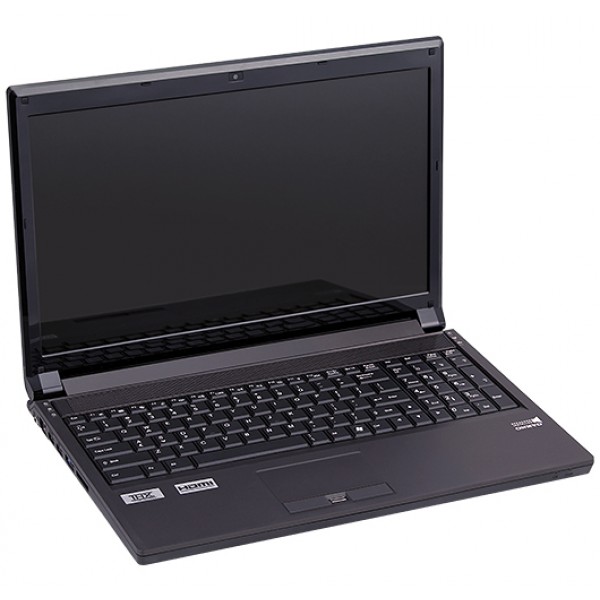
Top view of the CTL Vector 9150t
To kick off the overview of the CTL Vector 9150T, I’ll start with the looks of the particular model I received. My CTL Vector 9150T sports a 15.6″ LED back-lit matte finish screen, a very sleek unmarked black body, a back-lit keyboard with a multiple color options, and a sub-woofer. The CTL Vector 9150T is something I feel comfortable taking with me during a business trip, as well as something I could take to a LAN party. The looks scream business, while the performance screams gaming.
Inside we have a lithium-ion battery rated at 76.96wh, 4 DDR3 memory slots with a maximum capacity of 32GB, 2 megapixel camera, 9 in 1 card reader, and a 8xDVD±R/RW/4X +DL Super-Multi Drive. Overall, I wasn’t very impressed with the power consumption on this beast. The battery is rated to last 4 hours, but I’m probably getting about an hour or two of use before I need to do another charge, and that’s just surfing the internet. There are power saving functions to help extend the battery life, I just never explored them too deep. No matter how anymore markets it, we don’t buy gaming laptops for their power conservation, so I’m not complaining really.
The CTL Vector 9150T comes with a standard 1 year limited parts and labor warranty. While this is considered the industry standard, I generally lean towards those who offer a little more, it just shows more confidence in their products. However, research has shown that most of us will probably never use our warranties. I can’t knock a point off my review score for this, but I’d probably add a point if it was better. Like other manufacturers, you do have the option to purchase a 2 year or 3 year warranty for an additional cost.
The Keyboard
The keyboard has an awesome feel to it. I ran through some typing test on it and averaged 120 WPM, while on my mechanical keyboard with Cherry MX Black’s,I was averaging about 125WPM. That alone should say a lot about the responsiveness of this keyboard. I popped a key off and was surprised to see it was only a simple membrane keyboard. It really has a good tactile feel to it, even if it’s only a membrane keyboard.
Not a fan of the blue back lighting? Well CTL figured you might want to change that, or maybe you wanted it to light up to the sound of your music, do the wave, flash repeatedly, dance, or possibly even breathe. I have not seen a keyboard with this many features before in my life, it is truly a first for me. The awesome software pictured below is easily accessible by hitting your function key and the * button. You can pick one of eight lighting functions, as well as eight different colors to choose from. You can also press your function key and + or – to brighten or dim the keyboard to your preferred intensity.

The screen
The CTL Vector 9150T comes standard with a 15.6″ 1920×1080 LED backlit screen. This was honestly the first thing that my eyes shot to when I got this computer. The screen is really bright, and just looks crystal clear. I’m tempted to pick up one of their monitors now because of this. The quality of the screen looked better than my Dell laptop I used at work. (I can’t recall which model, but it was a performance model used for rendering 3d images)
Sound
The CTL Vector 9150T has two built-in speakers made by Onkyo with a subwoofer included. Again, this was a first for me. I had never seen a laptop with a subwoofer installed. The sound however wasn’t really as crisp as I would have expected it to be. It sounds good, and manages to get rather loud, it’s just not perfect. I don’t think I can really complain about it, not many companies manage to put subwoofers in their laptops. The sound really is above average, it’s just not nearly as clear as I’d hoped it would be.
Performance
So far I’ve only had the luxury of playing Assassin’s Creed 3 and Planetside 2 on the CTL Vector 9150T. On both games I was able to crank the graphics up to the extreme, and never once did I ever experience any stuttering. In Assassins Creed 3 I often found myself listening to some guy talk during the loading screens, something I felt they did for those with slower computers. Since my CTL Vector 9150T came equipped with a 128GB HyperX SSD, my load times were so minimal that the dialogue put there to please those with long load times, only made me impatient!
Planetside 2 is where I experienced my first little issue. The CTL Vector 9150t has some power saving functions that will disable the dedicated GPU and switch over to the less power hungry on board graphics. After I figured out that I had to plug my laptop in to use the on-board GPU, all was good again. I’m sure there is another way to disable that, but the battery on this thing just can’t handle playing a game for very long; I’d say 30 minutes max before you would have to charge it.
Assassin’s Creed 3 was the first game I loaded up on it. It was definitely the right experience to break the laptop in. The graphics were simply stunning on ultra high with a 1080p display. I wish I had a copy of Crysis to throw at this laptop, I feel confident it would handle it beautifully.
Product Comparison
I’m generally not one who compares brands. I’m more concerned with what is under the hood rather than what name is on the case. After all you don’t actually think laptop manufacturers make all their hardware do you? For this particular article, I found it important to do a product comparison. Some people out there just stick to a brand, and I think it’s important to see what kind of pricing you get for the same hardware when compared to other brands.
CTL Vector 9150t – $1644 (Actual price of my particular build is lower, some parts were no longer available for selection)
| Specifications | CTL Vector 9150T | Alienware M17X | ASUS G75VW-DS71 |
| Screen Size | 15.6″ 1920×1080 w/ Matte Finish | 17″ 1600×900 | 17.3″ 1920×1080 |
| GPU | Nvidia GTX 670M | Nvidia GTX 660M (670M no available) | Nvidia GTX 660M |
| CPU | Intel I7-3610QM | Intel I7-3630QM | Intel I7-3610QM |
| RAM | 16GB DDR3 (2X8GB) Dual Channel @ 1600Mhz | 16GB DDR3 (2X8GB) Dual Channel @ 1600Mhz | 12GB DDR3 |
| HDD | None | 500GB @ 7200RPM | 1500 GB @ 7200RPM |
| SSD | 128GB Crucial SSD | No equivalent | None |
| Warranty | 1 Year Limited | 1 Year Hardware & Software | 2 Year Global Warranty |
| Operating System | Windows 8 64-Bit Edition or Wndows 7 Home Premium | Windows 8 64-Bit Edition or Wndows 7 Home Premium | Windows 7 Home Premium |
| Optical Drive | 8X DVD/CD R/RW | Dual Layer CD/DVD Burner | Blu-Ray/DVD-RW/CD-RW |
| Total Cost | $1634 | $1674 | $1,399 |
Overall I feel their pricing is rather competitive when placed again Asus and Alienware. The only thing Alienware has over the Vector 9150T is the slightly better processor, and the larger screen (however a lower resolution). The ASUS laptop is pre-built, so you can’t change the options on it without selecting another model. I still think the Vector 9150T is better buy here, unless screen size is more important to you. I can tell you 17″ is too big for me, and 12″ is too small. The CTL Vector 9150T sporting a 15.6″ screen is perfect for me.
Edit The CTL Vector 9150t has since been replaced with the CTL Vector 9170T. It sports a similar look, however it comes with a 17″ screen and starting price is $1499. This may make the 9170T a better buy overall.
Final Thoughts
Pros
- Crystal clear display
- Solid performance.
- Very unique back-lit keyboard setup
- Thick plastic shell, with a very sturdy feel
- Responsive keyboard
Neutral
- Sound is above average, however it’s nothing exemplary
- Warranty is industry standard.
- Battery life – I don’t consider this negative, this machine was built for performance, and with performance comes a cost of power consumption. The power saving features on the laptop help compensate, however it’s not going to last as long as your ultrabook.
Cons
- None

I’d love to give the CTL Vector 9150T a 10 out of 10, but I reserve that for something that borders the impossible. So we’ll just say 9/10, but know it is a 10/10 to someone else.
The CTL Vector 9150t is a sleek, powerful, unique in features, and fully packed gaming laptop.
Did you have any problems with overheating? I read about these types of portable computers before. If I am not mistaken the body comes from Clevo, a company that manufactures a bare-bones product, that is like a laptop shell for third-party companies to compile in large amounts so that they could put their own hardware into. People who buy directly from Clevo (they make complete laptops as well) usually have to go through she-it customer service so that is a shame. It’s safer to order from another companies that uses the parts like Sager.