
Delidding Intel Ivy Bridge and Haswell: A How To [Pictures included]
The Delidding Procedure
(I would suggest reading this in its entirety before you begin)
The first precaution to take when delidding is to set up your workstation somewhere with very little to no dust (turn off fans). Then you should wash your hands and get them as dry as possible. Put on your vinyl gloves and your anti-static wrist strap and clip the other end onto something metal to keep you grounded. You can clip the wrist strap onto the frame of your computer case, a metal chair leg, or even your mat if you have a fancy mat with a port for a wrist clip. Make sure of course that the computer is fully unplugged befor you start. Now, use whatever tools you need and unfasten your current heat sink or water block and remove it from your CPU.
Use the ArctiClean #1 bottle by dropping about 5 to 6 big drops of it over the CPU until you see it soak into the thermal compound. Make sure not to let the ArctiClean or the thermal compound drip into the motherboard or CPU socket. Depending on what thermal compound you are removing from the CPU, you could ruin the motherboard if you drip any into the CPU socket pins. Let this settle for about 30 seconds and then wipe it and the thermal compound off of the CPU carefully with your Q-tips and a paper towel.
Repeat this process until you have wiped all the thermal compound off. Switch to the ArctiClean bottle #2 and use a few drops over the surface of the CPU again, wiping it off carefully when finished. If you chose to use 99% isopropyl alcohol, then go through the process until you stop seeing grime on your Q-tips. Even when it doesn’t appear that there is compound left, it may still be there at a micro level. Once finished, repeat the process on the thermal plate of your heat sink or water block.
Then, after you have designated a mat or work surface, unclip the CPU from its socket and set it on the designated surface. You can set it pin-side down, but be careful when moving it from this position so as not to damage the chip. Dispose of all used Q-tips, paper towels, and gloves at this point. Get out your pack of double sided razor blades and remove one of the paper covered blades. Take your ArctiClean #2 bottle (or 99% isopropyl alcohol if you’d rather) and give the blade a good wipe down. Blades typically ship lightly oiled and you’ll want to get the oil off completely before using them. You won’t want to handle slippery razor blades.
Now for the moment you were waiting for: Delidding.
Put your gloves back on, re-clip your anti-static wrist strap, and grab the razor firmly between your thumb and the side of your forefinger. Be careful to avoid making contact with the blade edge facing your hand. Hold the CPU propped on the side of its PCB and ease the blade in between the PCB and the metal heat spreader we’ll be removing. I would suggest to pick a corner to start and push the blade slowly in, but only slightly. Rotate the chip and do the same on the next corner until all corners have been done.
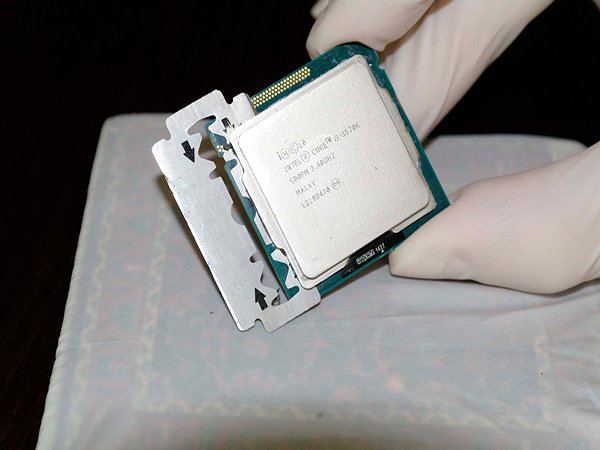
Wedge blade between IHS and PCB
Now you’re ready to do the same on the sides of the chip. This is where some people mess up their CPU’s, so be very careful during this portion. With the chip propped on its edge and the gold triangle on the front of the PCB facing down on the bottom left, you have the rectangular CPU die facing vertically. So, start at the top and you barely have to push it before you get dangerously close to the CPU die. Then rotate 180 degrees and do the same on the bottom. Now, all you have left are the sides! Do just the same for the side, but know that you have some extra space, so feel free to push it a bit further.