
Did Intel handpick pre-production Haswell CPUs for reviews?
Earlier this year a rumor that was confirmed by Intel was that Haswell processors had a design flaw for USB 3.0 in their manufacturing process. Intel admitted they had an issue but said when production for retail CPUs were made this would be fixed. Well a few months later and the much anticipated release of Intel Haswell CPU and we have found multiple reports of the retail CPUs and the pre-production CPUs are different. Basically the issues range from Haswell pre-production chips ran cooler, overclocked higher, and could possibly still have the USB 3.0 flaw in them.
Intel Haswell CPU
Intel Haswell Heat and Overclocking
Benchmarks from multiple sites when they got their new pre-production Intel Haswell CPU were very good. Due to NDAs they could not say or show anything until Haswell actually released but overall it showed an improvements vs. Ivy Bridge.
Multiple review sites and companies have disclosed that the retail Haswell CPU will heat up 10-15C from the pre-production CPUs. Any serious overclocker understands that if at stock clock speeds you want the lowest temperature possible to reach the highest overclocks which brings me to the next issue. Multiple sources reported that Haswell would be able to overclock from 3.5 Ghz to 4.6-48 Ghz pretty easily with the pre-production CPUs they were given and now after tested anywhere between 10-40 CPUs per source of Intel Haswell retail processors, they are reporting that getting a stable overclock at 4.2-4.3 is becoming difficult with the higher voltages and temperatures they are seeing when using the retail boxed version of Intel Haswell.
Haswell like Ivy Bridge has an internal thermal paste instead of a fluxless soldering. Now if you want to try and de-lid and fix this then you could be looking at vastly superior temps but if you did that with Ivy Bridge you did to. A Member of our forums, LyingHeart, actually de-lidded his i5-3570k and you can read what he did and look at his results here.
I look at it now as if you have a Ivy Bridge chip and wanting to upgrade to Haswell CPUs its not worth it unless you just want a better motherboard. Time could change this is other revisions are released but as it stands now its not worth the upgrade unless you have a Sandy Bridge or below CPU. Even then it might be worth it to go Ivy Bridge for the lower cost.
Intel Haswell USB 3.0 Issues
As I stated earlier about the know issues with the Haswell CPUs and USB 3.0 being fixed is that sites are reporting that it is still a big issue. Intel sees it as an “annoyance” more than a problem which I would agree on but since most people still don’t have multiple USB 3.0 thumb drives or devices, it is something that will go from annoyance to pain in the backside real quick.
One site that tested 22 different devices posted a chart of their results:
| Brand | Product | Test |
|---|---|---|
| Adata | S102 Pro Superior Series 32GB | OK |
| Corsair | Flash Survivor Stealth 32GB | OK |
| Corsair | Flash Survivor Stealth 64GB | error |
| Corsair | Flash Voyager GT Short 32GB (USB 3.0) | OK |
| Corsair | Flash Voyager GT Speed 32GB | OK |
| Corsair | Flash Voyager Slider 32GB | error |
| Corsair | Flash Voyager Slider 64GB | error |
| Freecom | Hard Drive Quattro 3.0 1TB USB 3.0 | OK |
| Icidu | Rubber Drive 32GB (USB 3.0) | error |
| Icidu | Slider Fast Flash Drive 32GB | error |
| Icidu | Slider Fast Flash Drive 64GB | error |
| iomega | Prestige 500GB USB 3.0 | error |
| Kingston | HyperX Max 3.0 64GB | error |
| LG | HXD7 500GB USB 3.0 | error |
| Philips | USB Flash Drive Snow Edition 64GB | OK |
| Sandisk | Cruzer Extreme 32GB | error |
| takeMS | MEM-Drive Easy III 64GB | error |
| Team | TP1023 Rico 640GB USB 3.0 | OK |
| Team | X101 USB 3.0 32GB | error |
| Verbatim | Store’n’Go V3 32GB | error |
| Verbatim | Store’n’Go V3 64GB | error |
| WD | My Passport Ultra 500GB USB 3.0 | OK |
They did go on to say that you can sometimes unplug and plug your USB 3.0 device back into your PC and it might work but it is far from a sure thing with the C1 Intel Haswell CPUs. To find out if you have a C1 or C2 revision of a Haswell chip just look into CPU-Z or comparable program and if you see revision “04” you have a C1 CPU and “05” is a C2 CPU.
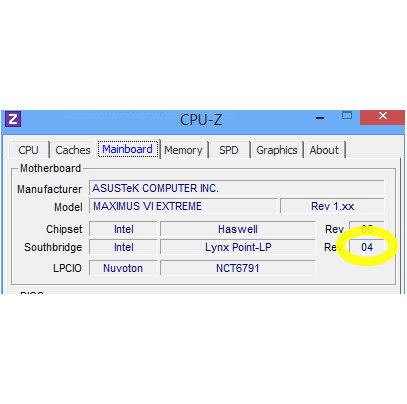
Intel Haswell CPU Revision
The Haswell CPU tested as you can see was the Revision 4 C1 stepping CPU so the C2 could have fixed this issue.
It is not that Intel Haswell is a bad chip, in fact you could say for mobile platforms that Haswell is the best chip but for the desktop users I feel we got the short end of the stick. High temps, lower overclocks, and issues with USB 3.0 vs Ivy Bridge is not a promising start to a platform that Intel has said is more significant than when they went from Pentium 4 processors to the Core series. We all knew that Haswell was suppose to be a huge step forward in the mobile world but it was also suppose to be a pretty good step forward for desktop PC enthusiast wanting to get the maximum amount of performance. Now it looks like a wait and see if they will fix the issues.
Join the Forum discussion on this post