
The Test Bench used to test the Noctua NH-U12S CPU Cooler was the AMD test drive system which includes:
Test System:
- ProcessorAMD A10-6800K
- MotherboardMSI FM2-A85XMA-E35
- ChipsetAMD A85X
- Memory8GB AMD RP1866 RAM
- Hard Drive
60GB Kingston SSDNow V300
- DisplayACER G276HLDbd 27″ LED Monitor
- Interface
DVI
Software used for testing:
- HWMonitor (Note: CoreTemp doesn’t recognize temperatures with the A10-6800K)
- Prime95
Using Prime95, we tested both the stock cooler and the Noctua NH-12S under a full load using the “In-place large FFTs” option on Prime95 to maximize heat. Our intent was to show how the Noctua NH-U12S CPU cooler performed on a socket FM2 APU versus the stock cooler. Keep in mind that temperatures of the AMD A10-6800K can reach up to 120 degrees Celsius before reaching its thermal threshold, so don’t freak out when you see these higher than Intel temperatures.
Noctua NH-U12S Temperature Benchmarks
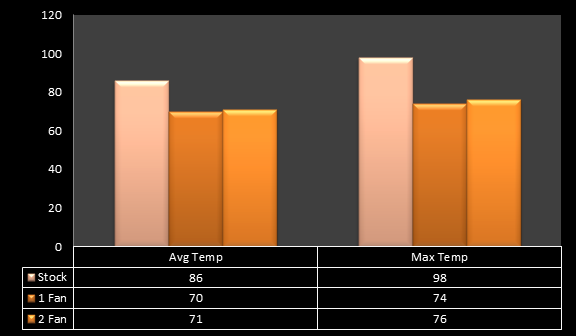
Noctua NH-U12S Benchmarks using single fan and dual fan setup.
Using the stock fan that comes with the A10-6800K, we saw temperatures average around 86 degrees under a full load and spike as high as 98. While we still have 22 degrees from reaching the thermal threshold, there just isn’t any room for overclocking here. It should be noted that both Clixxer and I had slightly different temperatures, while I was averaging around 86 degrees, he was in the low 90’s using the stock cooler.
We decided to test the Noctua NH-U12S in both single fan and dual fan (Push-Pull) configuration. Oddly enough I actually got slightly better temperatures using the single fan configuration then I did using the push-pull dual fan configuration. Utilizing the much beefier Noctua NH-U12S I saw temperatures drop as much as 16 degrees over the stock cooler on average, and our max temperature was 24 degrees less than the stock cooler. That pushed us to 46 degrees away from our thermal cutoff, giving us much more room for a modest overclock.
Noise Levels
I wish we could give you a solid sound level reading, but our attempts at providing accurate data at the time of the Noctua NH-U12S review just didn’t seem right. We attempted using an iPhone app called SPL meter that showed sound levels in the room around 55dba. Once we cranked up the Noctua fans the meter would hardly read any significant change. Perhaps it was accurate, but until we do a bit more research I’m going to leave that hard data alone until the end of July once we develop a better method.
Lack of testing procedures and equipment or not, the Noctua NH-U12S was completely silent. With it sitting next to my closed loop rig, I still can’t hear a single thing. At full load the Noctua NH-U12S is more silent than my Thermaltake Water 2.0 Extreme.
Next Page: The Noctua NH-U12S Review Final Verdict