
Thermaltake Shock Spin HD Gaming Headset Review
Today we take a look at the Thermaltake Shock Spin HD Gaming Headset. If there was a quality versus performance ratio for gaming headsets, these would take the trophy. Priced at a modest $60, these things deliver sound like no other gaming headset in the $100 or below range.
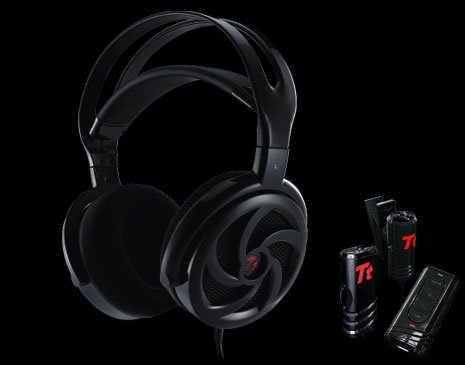
First off at a price point of $60 for the Thermaltake Shock Spin HD Headsets, you can’t expect the full package, however I think Thermaltake really went out of their way to provide you the best audio quality for the cheapest price here. The cans are huge, and not in a bad way. They fit comfortably over your entire ear, and have an extremely comfortable feel. They also come equipped with 50MM Neodymium magnetic speakers, and 7.1 virtual surround sound to provide you some rather good quality sound for a low-end headset. Let’s break it down.
Sound quality and Features

Hardware Included with Thermaltake Shock Spin HD Headset:
- In line volume controller with 3.5MM Headphone and Microphone jack with USB input cable.
- In line volume controller with 3.5MM Headphone jack only, with 3.5mm input cable.
- Clip on Microphone with independent on off switch.
I can’t say the bass is the best I have ever heard, however it is definitely the best I have heard since my days of buying $20-$30 off the shelf headsets. It’s plenty for gaming, and I’ve actually heard sounds in-game that I hadn’t heard before using my Razer Cacharias, Creative Fatal1tys, or my Razer Blacksharks. If someone asked me for a good pair of headphones strictly based on sound, I’d recommend these over any other headset I have owned. While the 50mm speakers are the major highlight of the Thermaltake Shock Spin HD headsets, there are a few other features I’d like to highlight.
In addition to the 50mm speakers, the Thermaltake Shock Spin HD headsets also offer a 7.1 virtual surround sound, an in line volume controller, and independent software used for mixing sound. The in line volume controller comes equipped with volume up/down, a microphone mute button, and a headset mute button as well. My favorite thing about the in-line controller is that it’s actually USB. You simply plug-in two 3.5MM jacks from the microphone and the headset into the controller. From there, the controller plugs in via USB allowing you to connect this device almost anywhere. As an added bonus, you can simply plug the Thermaltake Shock Spin HD’s directly into any multimedia device using the 3.5mm jack for audio on the go. However with everything good, there is typically something bad.
One thing that stood out to me was the comfort. There is a very flexible, rubber-covered type material that rest on your head. This is unlike most headsets where the hard plastic is generally covered by a small stiff pillow. In extended gaming sessions I’ve never felt discomfort what so ever. The Thermaltake Shock Spin HD’s are the most comfortable headsets I have ever worn, and appear to be perfect for any sized head.
There was good, now here’s the ugly.

So what’s the bad about the Thermaltake Shock Spin HD’s you ask? Well, the microphone is a clip-on microphone, which I frankly wasn’t too excited about. To make matters worse, it’s also omni-directional. So while sitting my loft at the house and talking on Ventrillo or Teamspeak, you can hear Mickey Mouse playing while I’m talking. I also had some issue getting people to hear me when I first started using them; however I managed to make a few adjustments in the software as well as windows to fix that issue. Regardless of this minor oversight, I still chose to use these headphones over any other headset I have in the house. The sound in these things is just killer for gaming, and I’m not the one who has to hear me talk anyways, ha ha.
When these debuted at $90 I probably would have said to stay away, just because of the lack of a quality microphone. However at this time you can find them for $60, at that price the Thermaltake Shock Spin HD’s are a steal.

For more additional sound specifications you visit the Ttesports page.